Coaching centre management software: how to choose one in India
What coaching centre software costs in India, the four features you need and the questions to ask before you buy.
Coaching centre management software is one system for the jobs a coaching institute repeats every day: taking enquiries, admitting students into batches, collecting fees in instalments with proper receipts, and marking attendance. A good one replaces the admission register, the fee book and the spreadsheet of batch timings, so everyone works from the same record.
Choosing one is harder than it should be. Most “best software” lists are written by vendors about themselves, and very few publish prices. This guide gives you what those lists leave out: what the software really costs in India, the features a coaching centre needs (and the ones it does not), the questions to ask in a demo, and a checklist you can print. It is written by a vendor too, so we say plainly where InstiOne fits and where it may not. If you already have a shortlist and want named products side by side, read coaching centre software compared instead.
Do you need software yet?
Not always. If you run one centre, with one person keeping the records and a handful of batches, a well-kept spreadsheet can be enough. We compare the two honestly in Excel vs management software.
The signs it is time to move are practical ones:
- An enquiry from last month was never called back, and nobody noticed.
- Finding who has not paid this month’s instalment takes an afternoon.
- Two batches were booked with the same teacher or room.
- More than one person edits the same records, and they disagree.
- You are planning a second branch.
If two or more of these sound familiar, read on.
The features a coaching centre actually needs
Vendors list fifty modules. A coaching centre lives on four. Judge every product on these first.
1. Enquiries and admissions
The busy weeks before a new session decide your year. You need every enquiry in one list, with the next follow-up date and who is handling it, and a one-step way to turn a confirmed enquiry into a student without typing the details again. Ask to see how a counsellor logs a call: if it takes more than a few seconds, staff will go back to their notebooks. This is what an admissions CRM is for.
2. Courses and batches
A course is what you teach; a batch is one dated run of it, with a teacher, a timing, a room and a seat limit. Software that mixes the two up makes fees and attendance messy later. Check that one course can run as many batches as you like (weekday morning, weekend, crash course) and that the system warns you about teacher and room clashes. More in running batches and on the batch scheduling page.
3. Fees, instalments and receipts
Most coaching fees are paid in instalments, in cash or by UPI. The software must record each payment against the student, issue a receipt with the next number in an unbroken sequence, show who owes what today, and handle refunds without deleting anything. If a payment can be edited or a receipt deleted without a trace, walk away. Our fee collection guide explains why, and the fees and receipts page shows how InstiOne does it.
4. Attendance
Teachers need to mark a batch in under a minute, on a phone, and you need to see who has been absent for a week before the parent calls you. Check how attendance is taken and whether absences are easy to spot.
Useful, but not a reason to buy
Online tests, a branded app, biometric devices, a website builder, payroll and a learning library can all be useful. Treat them as tie-breakers. A product that is brilliant at online tests but clumsy at fees will cost you more time than it saves.
What coaching software costs in India
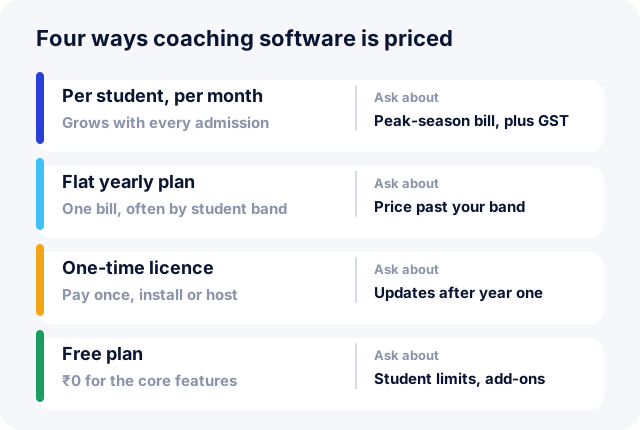
This is the question most guides skip, so here are the four ways it is usually priced.
| Model | How it works | Watch for |
|---|---|---|
| Per student, per month | You pay for each active student. Rates we saw published in October 2026 were mostly in the ₹12–₹120 range. | The bill rises in your busiest months. Ask whether prices include 18% GST. |
| Flat yearly plan | One price a year, usually for a band such as “up to 300 students”. | What happens when you cross the band mid-year. |
| One-time licence | Pay once for software you install or host. | Updates, support and backups after the first year are often extra. |
| Free plan | Core features at ₹0. | Student limits, and which features are locked behind a paid plan. |
Work out a real number before you compare. Take your peak student count, not your average. For a centre with 150 students on a ₹15 per student per month plan:
- 150 students × ₹15 × 12 months = ₹27,000 a year
- add 18% GST = ₹31,860 a year
Then add the costs that are easy to miss:
- Setup or onboarding fees, and whether importing your old data is included.
- SMS and WhatsApp messages, usually charged per message on top of the plan.
- Extra staff logins or a separate charge for the student or parent app.
- Payment gateway fees if students pay online (usually a percentage of each payment).
- Hardware such as biometric devices, if you want them.
Ask every vendor for a written quote that lists all of these for your student count.
Ten questions to ask in a demo
A demo is a sales pitch; these questions turn it into a test. Ask the salesperson to do each task live, on screen, not to describe it.
- Add an enquiry, set a follow-up for tomorrow, then turn it into a student in a batch. How many steps was that?
- Record a part payment in cash and show me the receipt. What number did it get?
- I made a mistake on that receipt. How do I correct it, and what trail is left?
- Show me every student with fees overdue today, for one batch.
- Mark attendance for a batch of 30 on a phone. How long did it take?
- Move a batch to a new timing. Does it warn me if the teacher is busy?
- Give a counsellor access to enquiries only, not fees. Can they see anything else?
- Can I import my students and their dues from Excel? Who does it?
- How do I export all my data, and in what format, if I leave?
- Where is my data stored, and who at your company can see it?
The answers to questions 3, 7 and 9 tell you the most. Money that can be edited quietly, access that cannot be limited, and data you cannot take with you are the three problems that are hardest to fix later.
Run a one-week trial with real work
Never decide from a demo alone. Most products have a free trial or a free plan, so use it properly:
- Pick one batch and one person to run the trial.
- Enter that batch’s real students, timings and fee plan.
- For one week, record every payment and take attendance in the software, alongside your current method.
- At the end of the week, check that the dues list matches your fee book.
If the dues match and your staff did not go back to paper by Wednesday, you have your answer. Our checklist for moving your institution off paper covers the full switch once you have chosen.
A checklist you can print
Score each product from 1 (poor) to 5 (excellent).
| Check | Product A | Product B |
|---|---|---|
| Enquiry to admission in a few steps | ||
| Course and batch kept separate, clashes warned | ||
| Receipts numbered in sequence, never deleted | ||
| Overdue fees list in one click | ||
| Attendance on a phone in under a minute | ||
| Roles: staff see only what they need | ||
| Data export at any time | ||
| Yearly cost at peak students, with GST | ||
| Works on phone and laptop | ||
| Support in your working hours |
Where InstiOne fits
InstiOne is the software we build, so weigh this section accordingly. It covers the four daily jobs above, with roles and permissions so each person sees only their part, a student mobile app, and multi-branch support for when you open a second centre. The Free plan has no student limit and costs ₹0, and you can export your data at any time (pricing).
It may not suit you if you need biometric devices wired in today, or you want a vendor to run your centre’s website and marketing for you. Whatever you choose, use the questions and the checklist above. They work for any product, including ours.